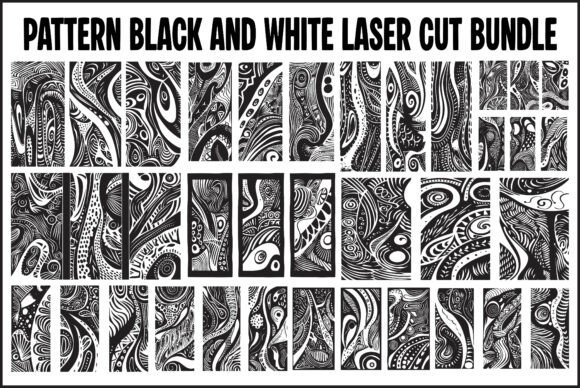
Modern Abstract Laser Cutting Templates
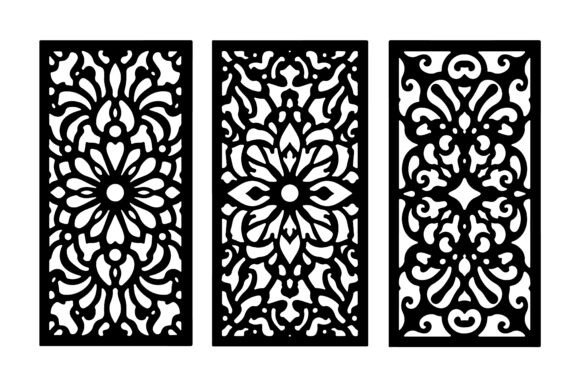
Abstract Pattern Laser Cutting Templates offer a unique bridge between digital design and physical creation. At their core, these files are vector-based blueprints that guide machines to cut intricate shapes out of materials like wood, acrylic, metal, or paper. Unlike traditional geometric grids or realistic illustrations, abstract patterns rely on fluid lines, organic curves, and non-representational forms to create visual interest. This specific bundle focuses on high-contrast black and white designs, which simplifies the preparation process for laser cutting software while ensuring clean, precise cuts.
The value of these templates shifts significantly depending on who is using them. For a seasoned industrial designer, the priority might be the editability of the EPS files within Adobe Illustrator to tweak node points for a custom fit. For a weekend hobbyist with a desktop Cricut, the immediate usability of the SVG format is paramount. Understanding these differing needs helps users select the right tools and approach for their specific projects.
Why Abstract Designs Matter in Fabrication
Abstract patterns have gained traction in modern interior design and crafting because they are versatile. They do not date as quickly as trend-specific imagery, and their lack of literal subject matter allows them to blend into various decor styles, from minimalist to bohemian. When applied to laser cutting, these designs transform flat sheets into textured screens, room dividers, or decorative wall art that plays with light and shadow.
The "black and white" nature of this bundle is not just an aesthetic choice; it is a functional one. Laser cutting software typically interprets black lines as cut paths and white space as untouched material. By providing clean, high-contrast files, these templates reduce the time spent cleaning up images before sending them to the machine. This efficiency benefits everyone from the busy small business owner fulfilling orders to the educator preparing a classroom demonstration.
Perspectives for Beginners and Hobbyists
If you are new to laser cutting or digital crafting, the learning curve can feel steep. Abstract Pattern Laser Cutting Templates lower this barrier by providing ready-to-use assets. A beginner might prioritize ease of use above all else. With 12 pre-made SVG files included in this bundle, a novice can immediately load a design into their machine's software without needing to draw complex vectors from scratch.
For hobbyists, the creative potential lies in experimentation. Because the designs are abstract, there is less pressure to achieve perfect realism. A user might test different materials—cutting the same floral abstract pattern in thin plywood for a rustic look or in clear acrylic for a modern vibe. The transparent PNG files included in the package are particularly useful here, allowing beginners to overlay the designs onto photos of their intended space to visualize the final result before making a single cut.
Professional Applications and Commercial Use
Professionals, such as architects, interior designers, and sign makers, often evaluate these templates based on flexibility and scalability. The inclusion of EPS files is critical for this group. These fully editable vector formats allow a professional to stretch, shrink, or modify the pattern to fit specific dimensions, such as a custom-sized lobby screen or a branded office partition.
For entrepreneurs running a small fabrication business, speed and reliability are currency. Using pre-vetted templates reduces design time, allowing more focus on production and finishing. The high-resolution JPGs serve a practical purpose here as well; they can be used instantly for client presentations, website mockups, or social media marketing to showcase potential products before the physical item is even manufactured. The ability to customize colors and sizes easily means a single template can generate multiple product variations, increasing the commercial value of the purchase.
Educational and Creative Exploration
Educators and workshop leaders may find these templates valuable for teaching the principles of vector graphics and machine operation. Abstract patterns are excellent for demonstrating how line weight, spacing, and connectivity affect structural integrity in cut materials. Students can learn why certain connections must remain intact to prevent a design from falling apart during the cutting process.
Furthermore, digital artists and bloggers looking to create content around DIY projects can use the PNG and JPG files to create tutorials or inspirational posts. The clean aesthetic of the black and white contrast makes for compelling thumbnails and blog headers. For this audience, the "digital artwork" aspect of the bundle is just as important as the physical cutting capability.
Technical Considerations and File Formats
When selecting files for a project, understanding the specific strengths of each format ensures the best outcome. This bundle provides four distinct types, each serving a different stage of the workflow:
- EPS (Encapsulated PostScript): Best for professional design work. These files are compatible with industry-standard software like CorelDRAW and Adobe Illustrator. They allow for deep editing of anchor points and paths, making them ideal for large-scale CNC projects where precision is non-negotiable.
- SVG (Scalable Vector Graphics): The gold standard for hobbyist machines like Silhouette and Cricut. These files scale infinitely without losing quality and are lightweight, making them easy to share and store. They are perfect for direct import into cutting software.
- PNG (Portable Network Graphics): Essential for digital layering. With transparent backgrounds, these files allow users to place the abstract patterns over other images or textures in photo editing software. They are great for creating mockups or digital invitations.
- JPG (Joint Photographic Experts Group): High-resolution raster images suitable for printing previews or viewing on any device without special software. While not editable as vectors, they provide a quick visual reference of the design intent.
Making the Right Choice for Your Project
Deciding whether these templates match your goals comes down to assessing your current resources and objectives. If your primary goal is learning, start with the SVG files and a inexpensive material like cardstock to understand how the machine handles the curves. If your goal is commercial production, invest time in mastering the EPS files to create proprietary variations that set your products apart.
Cost-effectiveness is another factor. Purchasing a bundle of 12 coordinated designs is generally more efficient than sourcing individual files, especially for businesses needing a cohesive collection for a client project. The long-term usefulness of abstract designs cannot be overstated; unlike a template featuring a specific holiday or fleeting trend, these modern symbols remain relevant across seasons, offering sustained value for your library.
Ultimately, Abstract Pattern Laser Cutting Templates are more than just digital files; they are enablers of creativity. Whether you are crafting a personalized gift, designing a large-scale architectural feature, or teaching the next generation of makers, these tools provide the foundation needed to turn a digital concept into a tangible reality. By choosing the right format for your skill level and clearly defining your project needs, you can maximize the potential of every cut.